WhatsApp as a Conversion: What Google Analytics Can and Can't Track
The challenge of tracking WhatsApp conversions
WhatsApp is the default messaging app for millions of businesses, making it a vital channel for marketers running campaigns. A WhatsApp conversation often signals strong intent—a prospect ready to chat, ask questions, or book an appointment.
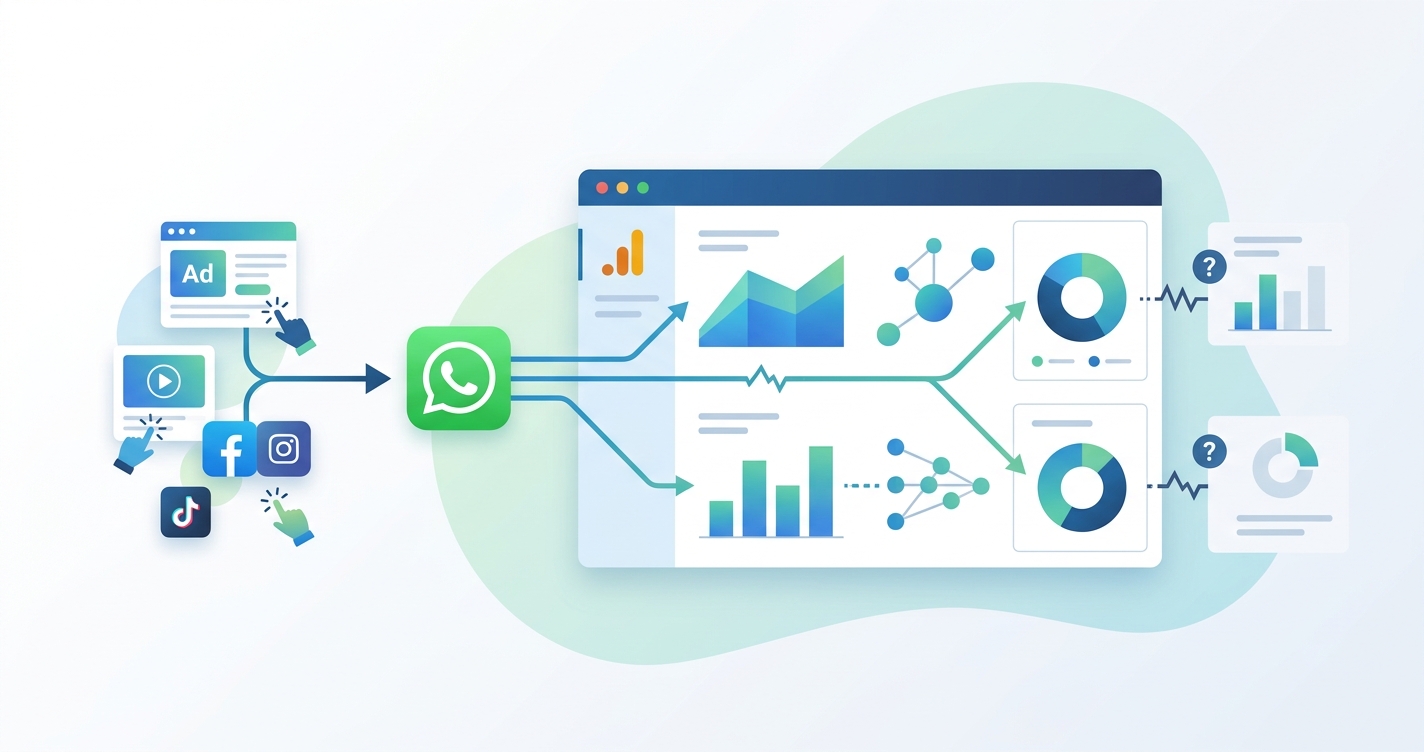
But capturing the value of these conversations in your marketing analytics isn’t straightforward. The biggest hurdle is the jump from your site to the WhatsApp app. At that moment, you lose visibility, and your attribution system can’t connect the ad click to the actual conversation.
What’s trackable: Setting up WhatsApp click events in Google Analytics
It’s standard practice to track when a visitor clicks a WhatsApp button on your website using Google Analytics. Here’s what that really means:
- You can register a click event (often named
whatsapp_click) using Google Tag Manager (GTM). This is done by setting up a trigger that fires whenever a link containingwa.meorapi.whatsapp.comis clicked. - GTM lets you configure link click triggers based on URL, or you can use selectors tied to specific text or classes when WhatsApp links are inside widgets.
- Once the event fires, you’ll see these clicks in your Google Analytics event reports. You can then mark
whatsapp_clickas a key event (the new term for a conversion). - The final step is importing this key event into Google Ads, either through the Google Analytics data stream or by firing a direct Google Ads conversion tag from GTM.
This workflow gives you a clear report of how many people clicked to message you on WhatsApp. It’s the foundation of nearly every standard tracking tutorial.
What breaks: Visibility gaps after the click
When a user leaves your website to open WhatsApp, all standard tracking stops. This handoff introduces significant data gaps:
- Session continuity ends. Analytics platforms can only observe activity happening on your website. Once the visitor switches to the WhatsApp app, you lose the ability to track any further behavior.
- You can’t see the message. Neither Google Analytics nor Google Ads knows if the prospect actually sends a message after clicking—the tools only record the intent to chat.
- No outcome data. Whether the prospect becomes a customer, books a meeting, or abandons the chat, this information is completely invisible to your marketing stack.
Tracking a WhatsApp button click is only tracking an intention—not a real conversation, not a qualified contact, and not a sale. That distinction is critical for both analytics and ad optimization.
Connecting WhatsApp conversations to ad clicks: What’s possible
You can connect a WhatsApp conversation back to the specific ad click that drove it, but doing so requires manual workarounds and is not tracked by default.
What’s possible with manual effort:
- On the landing page, you can capture URL parameters (like GCLID for Google Ads or UTMs for any source) when the visitor arrives.
- If you pre-fill the WhatsApp message with a unique token or those parameters (
?text=Hi, my code is {token}), and the user sends it, you can capture that code. - Later, you can manually link a conversation containing the token back to the original ad click, then upload offline conversions into Google Ads for better attribution.
What’s not possible by default:
- You can’t automatically read message content or user identity from WhatsApp.
- If a visitor changes the pre-filled message or deletes the token, the connection is lost.
- Many users start conversations their own way (no token, cross-device), which complicates matching.
The typical attribution flow, before any advanced automation, is a multi-step manual process that often breaks. Cookies can be lost, especially with privacy-centric browsers, and users often return days later from a different device.
Attribution pitfalls: When “WhatsApp clicks” mislead optimization
Optimizing Google Ads or Meta Ads to maximize WhatsApp clicks, instead of real contacts, can backfire.
- Your ad platform will overvalue empty clicks. If you tell Google Ads to bid for more WhatsApp clicks, but many clickers never send a message, the algorithm will waste spend on campaigns that generate clicks but few customers.
- There is a risk of double-counting. Clicks can be counted multiple times if the same visitor clicks a WhatsApp button on different visits, which misleads your conversion data.
- Best practice: Use WhatsApp click events as secondary micro-conversions, but measure qualified contacts or sales as your primary key events whenever possible.
Watch for discrepancies between WhatsApp click volume and actual conversations. If click numbers climb but real-world contacts stagnate, your campaigns are likely optimizing for a low-value action.
Tracking complications: Widgets, SPAs, and third-party plugins
Modern web design creates extra hurdles for reliable WhatsApp tracking.
- Third-party chat widgets often render links dynamically. GTM triggers relying on static link selectors can miss these, requiring more robust CSS selectors or event listeners.
- Single-page apps (SPAs) change page content without a full reload, which can break click triggers if not tested thoroughly.
- Injected elements and template-driven content may require additional GTM configuration and validation.
It’s essential to test all scenarios in Google Tag Assistant and the Google Analytics DebugView, especially after site changes.
Privacy, consent, and platform constraints
Proper customer data protection and legal compliance are foundational.
- You can only track what’s on your site. Once a user leaves for WhatsApp, their actions are out of reach. Message content and outcomes can’t be gathered unless the user proactively shares that information.
- WhatsApp Business Platform rules prevent the collection of unsolicited identifiers. Only the business account receiving the message can see its content.
- Privacy implications: Always inform users if you capture UTM parameters or assign tracking tokens, and update your privacy policy accordingly.
How HeyMotek addresses this
HeyMotek was built to bridge the gap between ad clicks and actual WhatsApp conversations. With a single snippet on your website, it automatically matches each WhatsApp contact to the original ad source, campaign, and creative—no manual work or spreadsheets needed. For Facebook Click to WhatsApp ads, attribution is captured directly.
The system sends three conversion event types back to Google Ads—Purchase, Qualified, and New Lead—based on your workflow. Meta Ads receives Purchase and New Lead events, training both platforms on real business outcomes instead of just clicks. This cross-platform sharing means a contact from a Google Ad can train Meta’s algorithm when they make a purchase, and vice versa. Both platforms get the complete picture of which ads deliver real customers.
HeyMotek removes the guesswork and manual effort of matching conversations to campaigns. It matches every WhatsApp customer to the ad that brought them and fires conversions back to Google Ads and Meta Ads automatically. Your ad budget starts shifting toward campaigns that deliver real customers, not just clicks. You get a full customer list, and your ad platforms get smarter with every conversation.
Start for free to see the true return on your ad spend.
See which ads bring your real WhatsApp customers.
Free plan. No credit card required 👏
Start for freeRelated integrations